v2.2 — Now Available

Dangerous Goods Manifest Processing Made Simple.

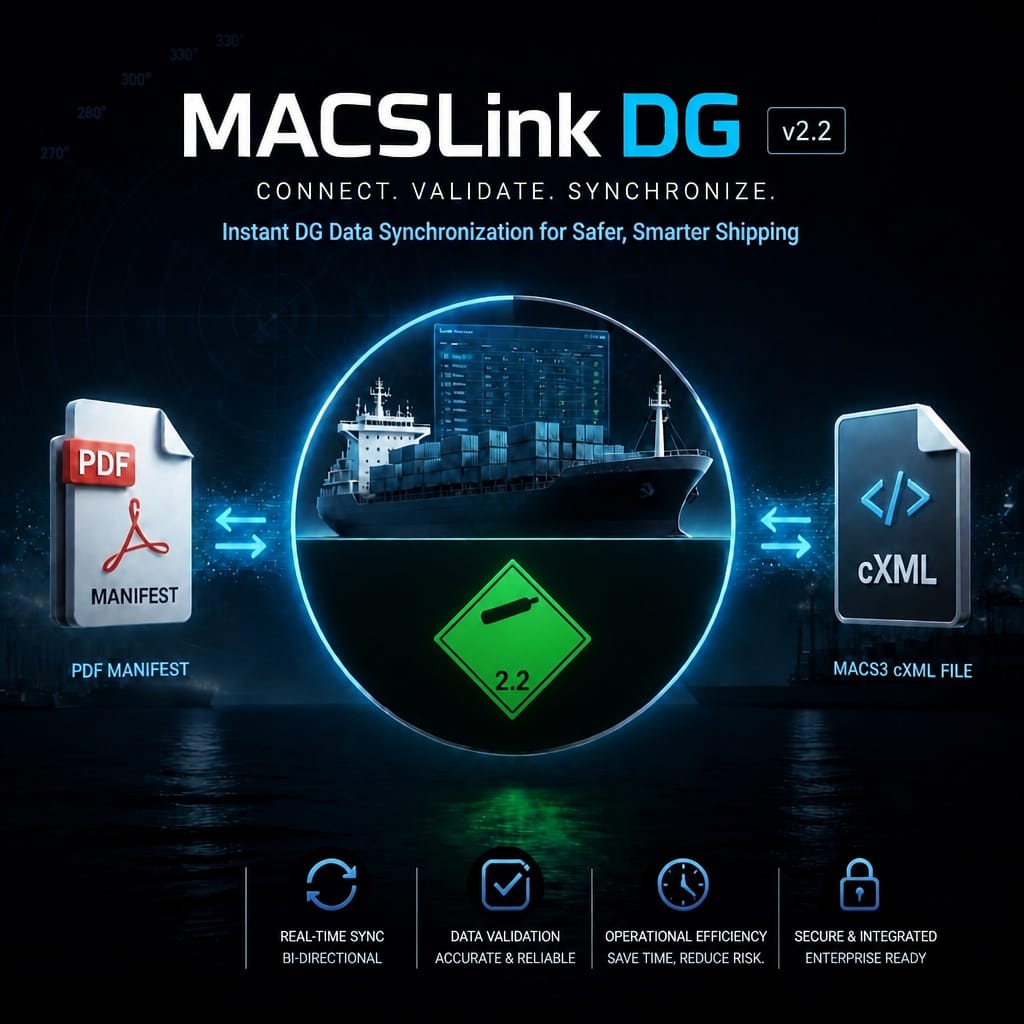
MACSLink DG is a desktop application that processes dangerous goods cargo manifests and synchronizes data with MACS3 — instantly, accurately, and without manual entry.

Enter your email → receive download link instantly · No credit card required

MACSLink DG — PDF Manifest to MACS3 cXML
PDF
Manifest Input
cXML
MACS3 Output
10s
Processing Time
// Product

Built for Maritime
DG Operations

Purpose-built for port agents, ship operators, and maritime logistics professionals handling dangerous goods documentation.

📄

PDF Manifest Parsing

Automatically extracts dangerous goods data from PDF cargo manifests — UN numbers, classes, quantities, stowage positions, and more.

🔄

MACS3 cXML Sync

Generates MACS3-compatible cXML files ready for direct import. Eliminates manual data entry and transcription errors.

Data Validation

Built-in validation checks ensure all DG entries are complete and correctly formatted before export.

Instant Processing

Process complete manifests with hundreds of DG entries in seconds. No cloud upload required — runs entirely on your desktop.

🔒

Offline & Secure

All data processing happens locally on your machine. No manifest data ever leaves your computer.

🖥️

Windows Desktop App

Native Windows application. No browser, no subscription portal — just install and run.

// How It Works

Three Steps to
Synchronized Data

From raw PDF to MACS3-ready cXML in under a minute.

Load Your Manifest

Import your dangerous goods PDF manifest directly into MACSLink DG. Supports all standard DG manifest formats.

Review & Validate

The application parses all DG entries and highlights any data that requires attention before export.

Export to MACS3

Generate a validated cXML file ready for direct import into MACS3. One click — no manual re-entry.

Repeat with Credits

Each processed manifest consumes one credit. Credits are valid for 365 days from activation. Re-processing the same manifest within 7 days uses no credits.

// Pricing

Simple, Transparent
Pricing

Start free. Pay only when you need more. No hidden fees, no auto-renewals.

FREE TRIAL

Trial

Evaluate MACSLink DG on your own manifests before committing.

Free

10 days — one per device

  • Full feature access for 10 days
  • Process real manifests
  • MACS3 cXML export
  • Trial key issued manually on request
Download & Request Trial

Enter your email → receive download link · Then contact us with your HWID for the trial key

Credit packs (500 / 1500 / 3000 credits) — coming soon  ·  All prices in USD  ·  Payments processed securely by Lemon Squeezy

// How to Use

The MACS3 Round-Trip,
Step by Step

MACSLink DG sits between MACS3 and your dangerous-goods PDF manifest. You export IMDG cargo from MACS3, reconcile it against the manifest, then merge the verified DG data back into MACS3 — a clean round trip with a full audit at the end.

⚙️

One-time setup: download MACSLink DG, then click Activate License and paste your key (GW-LUNA30-… for the 30-day license). The HWID is read from your PC automatically. The steps below are the workflow you repeat for every manifest.

PHASE A

Export the cargo from MACS3

in MACS3
1

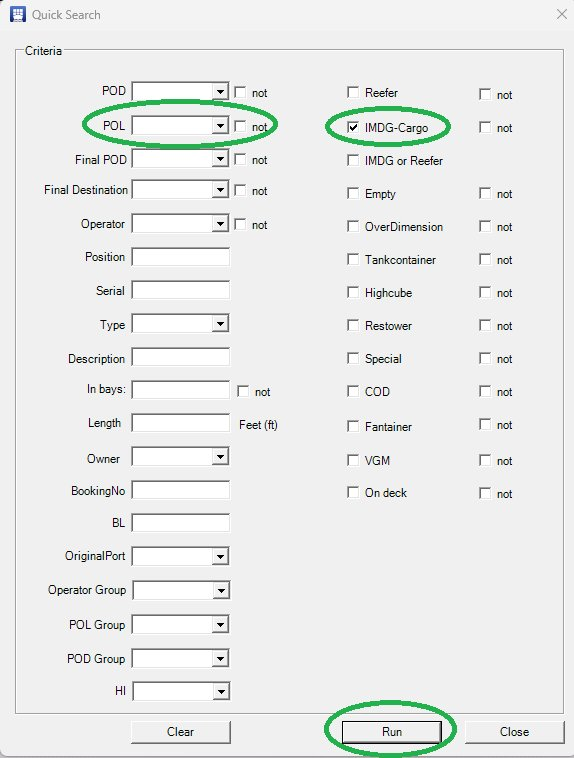
Filter for IMDG cargo

Open Quick Search, tick IMDG-Cargo, and set POL / POD if you want to narrow the list to one port. Click Run.

MACS3 Quick Search with the IMDG-Cargo filter selected
2

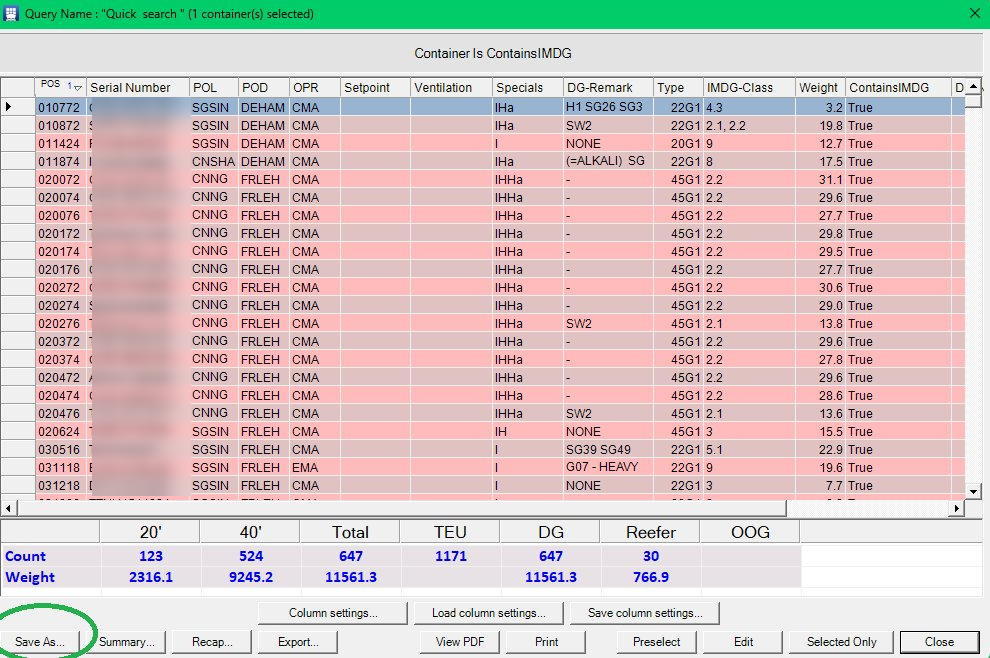
Review the result & save

The query returns every container flagged ContainsIMDG, with a count and weight summary at the bottom. Click Save As….

MACS3 query results listing the IMDG containers
3

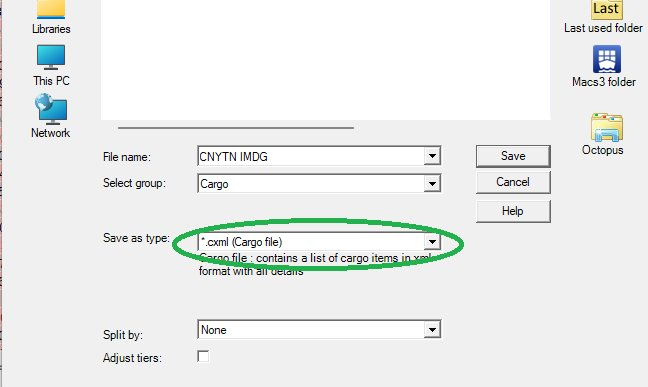
Export as a cXML cargo file

Set Save as type to *.cxml (Cargo file), give it a name (e.g. CNYTN IMDG), and save. This cXML is the cargo plan MACSLink DG will reconcile against.

Saving the cargo plan as a cXML file in MACS3
PHASE B

Reconcile & annotate

in MACSLink DG
4

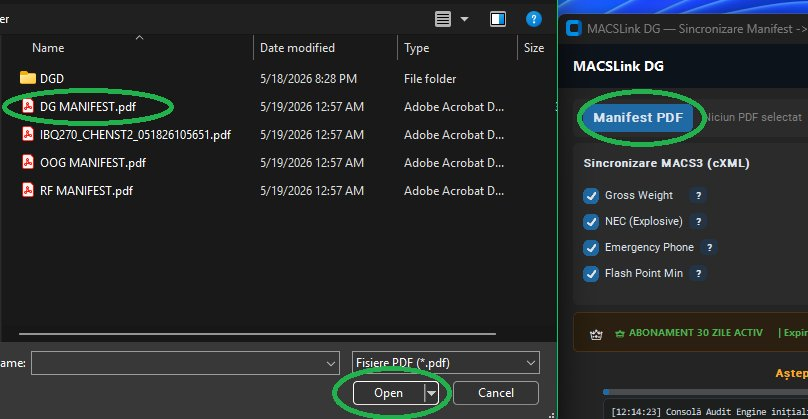
Load the DG manifest PDF

Click Manifest PDF and select your dangerous-goods PDF (e.g. DG MANIFEST.pdf). The filename appears next to the button.

Selecting the DG manifest PDF in MACSLink DG
5

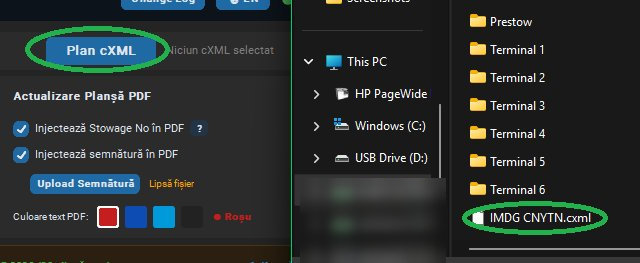
Load the cXML plan

Click cXML Plan and select the file you exported from MACS3 (e.g. IMDG CNYTN.cxml).

Selecting the exported cXML plan in MACSLink DG
6

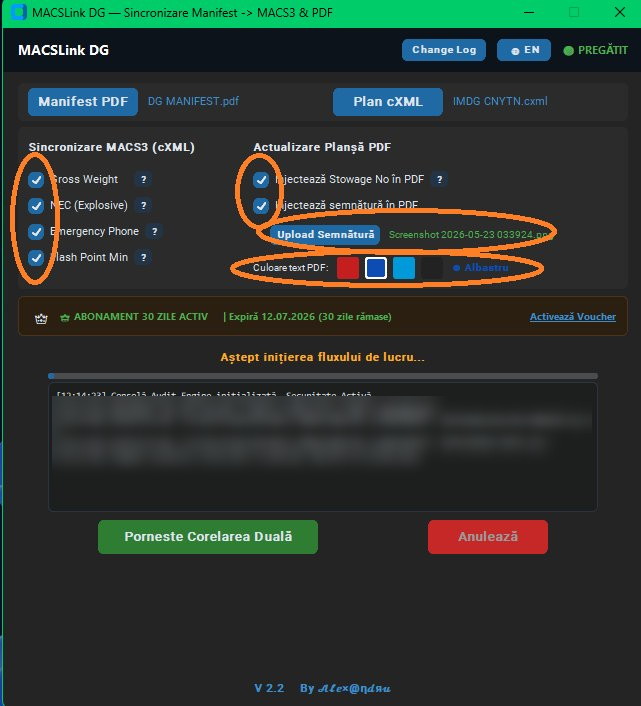
Choose sync & annotation options

Under MACS3 Synchronization, pick the fields to write back: Gross Weight, NEC (Explosive), Emergency Phone, Flash Point Min.

Under PDF Plan Update, optionally inject the Stowage No and a signature image into the PDF, and pick the annotation text color. Then click Start Dual Correlation.

MACSLink DG synchronization and PDF annotation options
7

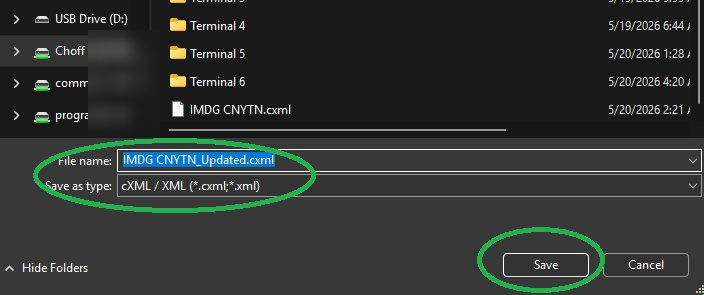
Save the updated cXML

Name the synchronized file (e.g. IMDG CNYTN_Updated.cxml) and save. This is the file that goes back into MACS3.

Saving the updated cXML from MACSLink DG
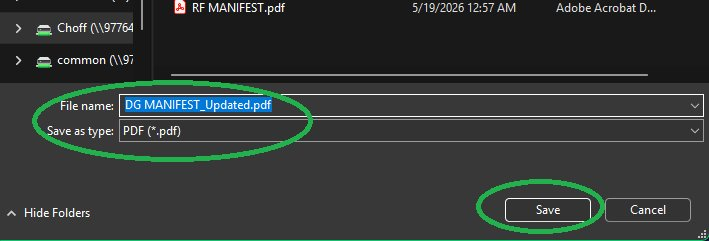
8

Save the annotated PDF

Name the marked-up manifest (e.g. DG MANIFEST_Updated.pdf) and save — your stamped copy with stowage positions and signature.

Saving the annotated PDF manifest
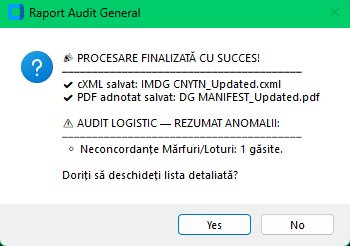
9

Read the audit summary

The Logistics Audit report confirms both files were saved and flags any anomalies it found between the PDF and the cXML — for example, a cargo/lot count that doesn't match.

MACSLink DG logistics audit summary
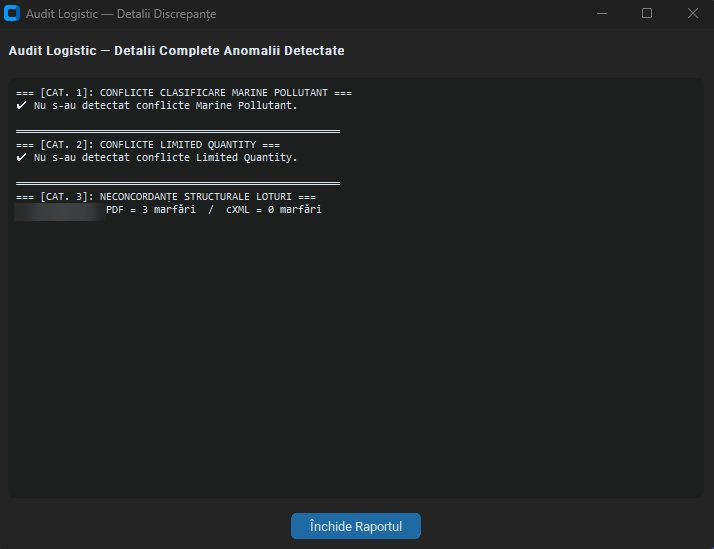
10

Open the detailed audit (optional)

The full report sorts anomalies into categories — Marine Pollutant conflicts, Limited Quantity conflicts, and structural lot discrepancies — so you can resolve any mismatch before merging back.

Detailed logistics audit report by category
💡 Re-running the same manifest is free for 7 days, so fixing a mismatch and re-processing won't cost an extra credit.
PHASE C

Merge the DG data back into MACS3

in MACS3
11

Load the updated cXML

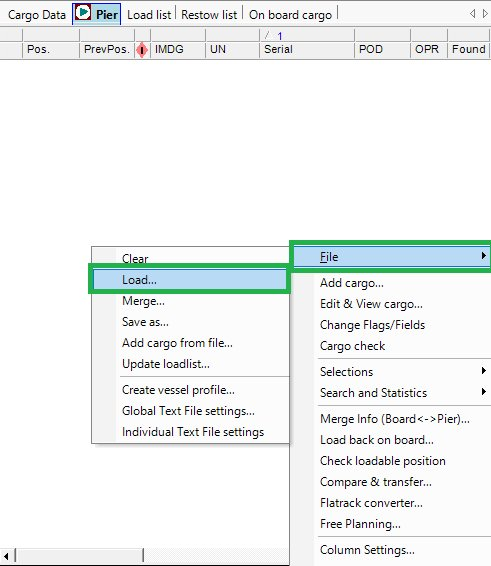
In the Pier view, go to File → Load… and open the …_Updated.cxml produced by MACSLink DG.

Loading the updated cXML in the MACS3 Pier view
12

Open Merge Info

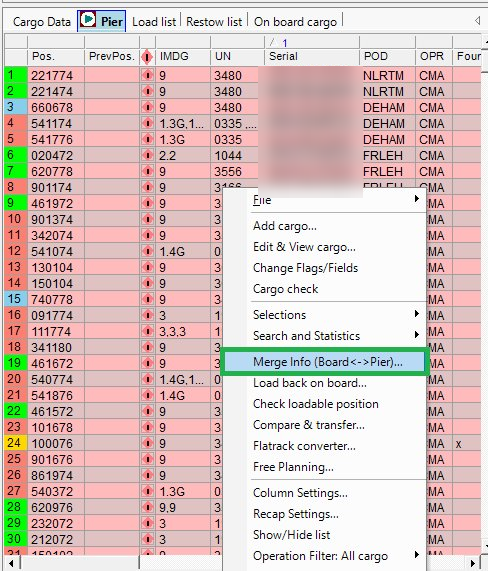
Right-click the cargo list and choose Merge Info (Board <-> Pier)….

Opening Merge Info in MACS3
13

Merge DG only

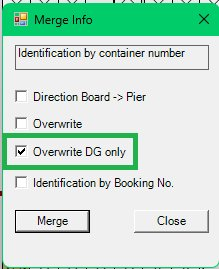
In the dialog, tick Overwrite DG only and click Merge. This updates the dangerous-goods fields without touching the rest of your plan.

Merge Info dialog with Overwrite DG only selected
14

Verify in Dangerous Goods

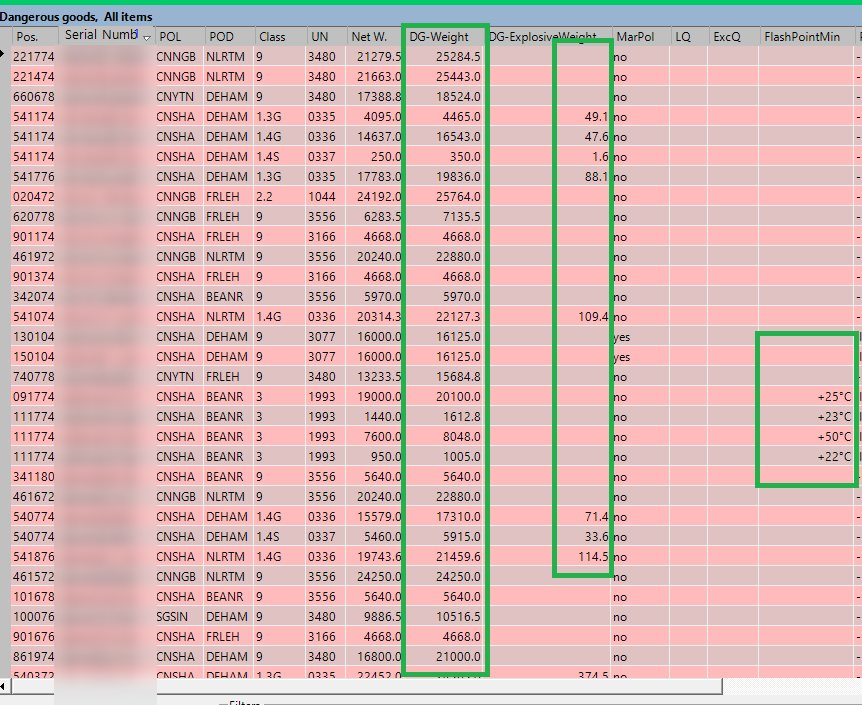
Open the Dangerous goods, All items view: DG-Weight, DG-Explosive Weight, and FlashPointMin are now populated from the manifest. The round trip is complete.

MACS3 Dangerous Goods view with DG data populated
// Legal

Terms & Conditions

Please read these terms carefully before purchasing or using MACSLink DG.

1. License & Usage

MACSLink DG is licensed software, not sold. Each license is tied to a single device identified by a unique Hardware ID (HWID). Transferring a license to another device is not permitted unless explicitly authorized by the developer. Licenses are non-transferable and may not be shared, resold, or sublicensed.

2. Trial License

A free 10-day trial is available upon request. One trial per device is permitted. The trial provides full feature access and is intended for genuine evaluation purposes. Circumventing trial limitations through technical means is a violation of these terms.

3. Paid Licenses

The 30-Day License grants full, unlimited access to MACSLink DG for 30 calendar days from the date of activation. Licenses are:

4. Refund Policy

Refunds may be requested within 48 hours of purchase if the license key has not been activated. Once a license key has been activated on a device, no refund will be issued. For technical issues preventing activation, please contact support before requesting a refund.

5. Intellectual Property

MACSLink DG and all related software, documentation, and materials are the intellectual property of the developer. Reverse engineering, decompiling, disassembling, or otherwise attempting to derive the source code of the application is strictly prohibited.

6. Disclaimer of Warranties

MACSLink DG is provided "as is" without warranty of any kind. The developer makes no representations or warranties regarding the accuracy of data extracted from PDF manifests. Users are responsible for verifying all output data before use in operational contexts. MACSLink DG is a productivity tool and does not replace professional judgment or regulatory compliance review.

7. Limitation of Liability

To the maximum extent permitted by applicable law, the developer shall not be liable for any indirect, incidental, special, or consequential damages arising from the use or inability to use MACSLink DG, including but not limited to loss of data, business interruption, or operational errors.

8. Updates & Support

Updates to MACSLink DG may be released periodically. Active license holders will be notified of significant updates. The developer reserves the right to modify features, pricing, or licensing terms with reasonable notice.

9. Governing Law

These terms are governed by the laws of Romania. Any disputes arising from the use of MACSLink DG shall be subject to the exclusive jurisdiction of the competent courts of Romania.

10. Contact

For licensing questions, technical support, or legal inquiries, contact: macslink.support@gmail.com

Last updated: June 2026  ·  by Alexandru

// Contact

Get in Touch

Questions, suggestions, or technical support — we're here to help.

📧 Support & Licensing

For license key requests (include your HWID), activation issues, or any technical questions about MACSLink DG.

macslink.support@gmail.com

💡 Suggestions & Feedback

Have an idea for a new feature or want to report a bug? We welcome all feedback and suggestions — write to us at the same address.

macslink.support@gmail.com